Visualizing Debugging Tensors of MXNet training
Overview
SageMaker Debugger is a new capability of Amazon SageMaker that allows debugging machine learning models. It lets you go beyond just looking at scalars like losses and accuracies during training and gives you full visibility into all the tensors ‘flowing through the graph’ during training. SageMaker Debugger helps you to monitor your training in near real time using rules and would provide you alerts, once it has detected an inconsistency in the training flow.
Using SageMaker Debugger is a two step process: Saving tensors and Analysis. In this notebook we will run an MXNet training job and configure SageMaker Debugger to store all tensors from this job. Afterwards we will visualize those tensors in our notebook.
Dependencies
Before we begin, let us install the library plotly if it is not already present in the environment. If the below cell installs the library for the first time, you’ll have to restart the kernel and come back to the notebook. In addition to that, in order for our vizualiation to access tensors let’s install smdebug - debugger library that provides API access to tensors emitted during training job.
[1]:
! python -m pip install plotly
! python -m pip install smdebug
Collecting plotly
  Downloading plotly-4.6.0-py2.py3-none-any.whl (7.1 MB)
     |████████████████████████████████| 7.1 MB 2.7 MB/s eta 0:00:01
Requirement already satisfied: six in /opt/conda/lib/python3.7/site-packages (from plotly) (1.14.0)
Collecting retrying>=1.3.3
  Downloading retrying-1.3.3.tar.gz (10 kB)
Building wheels for collected packages: retrying
  Building wheel for retrying (setup.py) ... done
  Created wheel for retrying: filename=retrying-1.3.3-py3-none-any.whl size=11430 sha256=46283dcf0af3312daf3effaf3394b9fadc3bfd0920e01a5b91200e5cfe69ae67
  Stored in directory: /root/.cache/pip/wheels/f9/8d/8d/f6af3f7f9eea3553bc2fe6d53e4b287dad18b06a861ac56ddf
Successfully built retrying
Installing collected packages: retrying, plotly
Successfully installed plotly-4.6.0 retrying-1.3.3
Requirement already satisfied: smdebug in /opt/conda/lib/python3.7/site-packages (0.7.2)
Requirement already satisfied: boto3>=1.10.32 in /opt/conda/lib/python3.7/site-packages (from smdebug) (1.12.45)
Requirement already satisfied: packaging in /opt/conda/lib/python3.7/site-packages (from smdebug) (20.1)
Requirement already satisfied: numpy<2.0.0,>1.16.0 in /opt/conda/lib/python3.7/site-packages (from smdebug) (1.18.1)
Requirement already satisfied: protobuf>=3.6.0 in /opt/conda/lib/python3.7/site-packages (from smdebug) (3.11.3)
Requirement already satisfied: jmespath<1.0.0,>=0.7.1 in /opt/conda/lib/python3.7/site-packages (from boto3>=1.10.32->smdebug) (0.9.5)
Requirement already satisfied: botocore<1.16.0,>=1.15.45 in /opt/conda/lib/python3.7/site-packages (from boto3>=1.10.32->smdebug) (1.15.45)
Requirement already satisfied: s3transfer<0.4.0,>=0.3.0 in /opt/conda/lib/python3.7/site-packages (from boto3>=1.10.32->smdebug) (0.3.3)
Requirement already satisfied: six in /opt/conda/lib/python3.7/site-packages (from packaging->smdebug) (1.14.0)
Requirement already satisfied: pyparsing>=2.0.2 in /opt/conda/lib/python3.7/site-packages (from packaging->smdebug) (2.4.6)
Requirement already satisfied: setuptools in /opt/conda/lib/python3.7/site-packages (from protobuf>=3.6.0->smdebug) (45.2.0.post20200210)
Requirement already satisfied: urllib3<1.26,>=1.20; python_version != "3.4" in /opt/conda/lib/python3.7/site-packages (from botocore<1.16.0,>=1.15.45->boto3>=1.10.32->smdebug) (1.25.8)
Requirement already satisfied: python-dateutil<3.0.0,>=2.1 in /opt/conda/lib/python3.7/site-packages (from botocore<1.16.0,>=1.15.45->boto3>=1.10.32->smdebug) (2.8.1)
Requirement already satisfied: docutils<0.16,>=0.10 in /opt/conda/lib/python3.7/site-packages (from botocore<1.16.0,>=1.15.45->boto3>=1.10.32->smdebug) (0.15.2)
Configure and run the training job
Now we’ll call the Sagemaker MXNet Estimator to kick off a training job with Debugger attached to it.
The entry_point_script points to the MXNet training script.
[2]:
import os
import sagemaker
from sagemaker.debugger import DebuggerHookConfig, CollectionConfig
from sagemaker.mxnet import MXNet

sagemaker_session = sagemaker.Session()

entry_point_script = "./scripts/mxnet_gluon_save_all_demo.py"
hyperparameters = {"batch-size": 256}
base_job_name = "mnist-tensor-plot"

# Make sure to set this to your bucket and location
BUCKET_NAME = sagemaker_session.default_bucket()
LOCATION_IN_BUCKET = "mnist-tensor-plot"
s3_bucket_for_tensors = "s3://{BUCKET_NAME}/{LOCATION_IN_BUCKET}".format(
    BUCKET_NAME=BUCKET_NAME, LOCATION_IN_BUCKET=LOCATION_IN_BUCKET
)

estimator = MXNet(
    role=sagemaker.get_execution_role(),
    base_job_name=base_job_name,
    train_instance_count=1,
    train_instance_type="ml.m4.xlarge",
    entry_point=entry_point_script,
    framework_version="1.6.0",
    train_max_run=3600,
    sagemaker_session=sagemaker_session,
    py_version="py3",
    debugger_hook_config=DebuggerHookConfig(
        s3_output_path=s3_bucket_for_tensors,  # Required
        collection_configs=[
            CollectionConfig(
                name="all_tensors", parameters={"include_regex": ".*", "save_steps": "1, 2, 3"}
            )
        ],
    ),
)
Estimator described above will save all tensors of all layers during steps 1, 2 and 3. Now, let’s start the training job:
[3]:
estimator.fit()
2020-04-27 22:51:56 Starting - Starting the training job...
2020-04-27 22:51:58 Starting - Launching requested ML instances...
2020-04-27 22:52:53 Starting - Preparing the instances for training......
2020-04-27 22:53:45 Downloading - Downloading input data...
2020-04-27 22:54:26 Training - Training image download completed. Training in progress..2020-04-27 22:54:27,736 sagemaker-containers INFO     Imported framework sagemaker_mxnet_container.training
2020-04-27 22:54:27,739 sagemaker-containers INFO     No GPUs detected (normal if no gpus installed)
2020-04-27 22:54:27,755 sagemaker_mxnet_container.training INFO     MXNet training environment: {'SM_HOSTS': '["algo-1"]', 'SM_NETWORK_INTERFACE_NAME': 'eth0', 'SM_HPS': '{}', 'SM_USER_ENTRY_POINT': 'mxnet_gluon_save_all_demo.py', 'SM_FRAMEWORK_PARAMS': '{}', 'SM_RESOURCE_CONFIG': '{"current_host":"algo-1","hosts":["algo-1"],"network_interface_name":"eth0"}', 'SM_INPUT_DATA_CONFIG': '{}', 'SM_OUTPUT_DATA_DIR': '/opt/ml/output/data', 'SM_CHANNELS': '[]', 'SM_CURRENT_HOST': 'algo-1', 'SM_MODULE_NAME': 'mxnet_gluon_save_all_demo', 'SM_LOG_LEVEL': '20', 'SM_FRAMEWORK_MODULE': 'sagemaker_mxnet_container.training:main', 'SM_INPUT_DIR': '/opt/ml/input', 'SM_INPUT_CONFIG_DIR': '/opt/ml/input/config', 'SM_OUTPUT_DIR': '/opt/ml/output', 'SM_NUM_CPUS': '4', 'SM_NUM_GPUS': '0', 'SM_MODEL_DIR': '/opt/ml/model', 'SM_MODULE_DIR': 's3://sagemaker-us-east-2-441510144314/mnist-tensor-plot-2020-04-27-22-51-55-980/source/sourcedir.tar.gz', 'SM_TRAINING_ENV': '{"additional_framework_parameters":{},"channel_input_dirs":{},"current_host":"algo-1","framework_module":"sagemaker_mxnet_container.training:main","hosts":["algo-1"],"hyperparameters":{},"input_config_dir":"/opt/ml/input/config","input_data_config":{},"input_dir":"/opt/ml/input","is_master":true,"job_name":"mnist-tensor-plot-2020-04-27-22-51-55-980","log_level":20,"master_hostname":"algo-1","model_dir":"/opt/ml/model","module_dir":"s3://sagemaker-us-east-2-441510144314/mnist-tensor-plot-2020-04-27-22-51-55-980/source/sourcedir.tar.gz","module_name":"mxnet_gluon_save_all_demo","network_interface_name":"eth0","num_cpus":4,"num_gpus":0,"output_data_dir":"/opt/ml/output/data","output_dir":"/opt/ml/output","output_intermediate_dir":"/opt/ml/output/intermediate","resource_config":{"current_host":"algo-1","hosts":["algo-1"],"network_interface_name":"eth0"},"user_entry_point":"mxnet_gluon_save_all_demo.py"}', 'SM_USER_ARGS': '[]', 'SM_OUTPUT_INTERMEDIATE_DIR': '/opt/ml/output/intermediate'}
2020-04-27 22:54:28,059 sagemaker-containers INFO     Module default_user_module_name does not provide a setup.py.
Generating setup.py
2020-04-27 22:54:28,059 sagemaker-containers INFO     Generating setup.cfg
2020-04-27 22:54:28,059 sagemaker-containers INFO     Generating MANIFEST.in
2020-04-27 22:54:28,059 sagemaker-containers INFO     Installing module with the following command:
/usr/local/bin/python3.6 -m pip install .
Processing /tmp/tmpqb80l0wp/module_dir
Installing collected packages: default-user-module-name
    Running setup.py install for default-user-module-name: started
    Running setup.py install for default-user-module-name: finished with status 'done'
Successfully installed default-user-module-name-1.0.0
WARNING: You are using pip version 19.3.1; however, version 20.0.2 is available.
You should consider upgrading via the 'pip install --upgrade pip' command.
2020-04-27 22:54:30,463 sagemaker-containers INFO     No GPUs detected (normal if no gpus installed)
2020-04-27 22:54:30,480 sagemaker-containers INFO     No GPUs detected (normal if no gpus installed)
2020-04-27 22:54:30,497 sagemaker-containers INFO     No GPUs detected (normal if no gpus installed)
2020-04-27 22:54:30,512 sagemaker-containers INFO     Invoking user script

Training Env:

{
    "additional_framework_parameters": {},
    "channel_input_dirs": {},
    "current_host": "algo-1",
    "framework_module": "sagemaker_mxnet_container.training:main",
    "hosts": [
        "algo-1"
    ],
    "hyperparameters": {},
    "input_config_dir": "/opt/ml/input/config",
    "input_data_config": {},
    "input_dir": "/opt/ml/input",
    "is_master": true,
    "job_name": "mnist-tensor-plot-2020-04-27-22-51-55-980",
    "log_level": 20,
    "master_hostname": "algo-1",
    "model_dir": "/opt/ml/model",
    "module_dir": "s3://sagemaker-us-east-2-441510144314/mnist-tensor-plot-2020-04-27-22-51-55-980/source/sourcedir.tar.gz",
    "module_name": "mxnet_gluon_save_all_demo",
    "network_interface_name": "eth0",
    "num_cpus": 4,
    "num_gpus": 0,
    "output_data_dir": "/opt/ml/output/data",
    "output_dir": "/opt/ml/output",
    "output_intermediate_dir": "/opt/ml/output/intermediate",
    "resource_config": {
        "current_host": "algo-1",
        "hosts": [
            "algo-1"
        ],
        "network_interface_name": "eth0"
    },
    "user_entry_point": "mxnet_gluon_save_all_demo.py"
}

Environment variables:

SM_HOSTS=["algo-1"]
SM_NETWORK_INTERFACE_NAME=eth0
SM_HPS={}
SM_USER_ENTRY_POINT=mxnet_gluon_save_all_demo.py
SM_FRAMEWORK_PARAMS={}
SM_RESOURCE_CONFIG={"current_host":"algo-1","hosts":["algo-1"],"network_interface_name":"eth0"}
SM_INPUT_DATA_CONFIG={}
SM_OUTPUT_DATA_DIR=/opt/ml/output/data
SM_CHANNELS=[]
SM_CURRENT_HOST=algo-1
SM_MODULE_NAME=mxnet_gluon_save_all_demo
SM_LOG_LEVEL=20
SM_FRAMEWORK_MODULE=sagemaker_mxnet_container.training:main
SM_INPUT_DIR=/opt/ml/input
SM_INPUT_CONFIG_DIR=/opt/ml/input/config
SM_OUTPUT_DIR=/opt/ml/output
SM_NUM_CPUS=4
SM_NUM_GPUS=0
SM_MODEL_DIR=/opt/ml/model
SM_MODULE_DIR=s3://sagemaker-us-east-2-441510144314/mnist-tensor-plot-2020-04-27-22-51-55-980/source/sourcedir.tar.gz
SM_TRAINING_ENV={"additional_framework_parameters":{},"channel_input_dirs":{},"current_host":"algo-1","framework_module":"sagemaker_mxnet_container.training:main","hosts":["algo-1"],"hyperparameters":{},"input_config_dir":"/opt/ml/input/config","input_data_config":{},"input_dir":"/opt/ml/input","is_master":true,"job_name":"mnist-tensor-plot-2020-04-27-22-51-55-980","log_level":20,"master_hostname":"algo-1","model_dir":"/opt/ml/model","module_dir":"s3://sagemaker-us-east-2-441510144314/mnist-tensor-plot-2020-04-27-22-51-55-980/source/sourcedir.tar.gz","module_name":"mxnet_gluon_save_all_demo","network_interface_name":"eth0","num_cpus":4,"num_gpus":0,"output_data_dir":"/opt/ml/output/data","output_dir":"/opt/ml/output","output_intermediate_dir":"/opt/ml/output/intermediate","resource_config":{"current_host":"algo-1","hosts":["algo-1"],"network_interface_name":"eth0"},"user_entry_point":"mxnet_gluon_save_all_demo.py"}
SM_USER_ARGS=[]
SM_OUTPUT_INTERMEDIATE_DIR=/opt/ml/output/intermediate
PYTHONPATH=/opt/ml/code:/usr/local/bin:/usr/local/lib/python36.zip:/usr/local/lib/python3.6:/usr/local/lib/python3.6/lib-dynload:/usr/local/lib/python3.6/site-packages

Invoking script with the following command:

/usr/local/bin/python3.6 mxnet_gluon_save_all_demo.py


Downloading /root/.mxnet/datasets/mnist/train-images-idx3-ubyte.gz from https://apache-mxnet.s3-accelerate.dualstack.amazonaws.com/gluon/dataset/mnist/train-images-idx3-ubyte.gz...
Downloading /root/.mxnet/datasets/mnist/train-labels-idx1-ubyte.gz from https://apache-mxnet.s3-accelerate.dualstack.amazonaws.com/gluon/dataset/mnist/train-labels-idx1-ubyte.gz...
Downloading /root/.mxnet/datasets/fashion-mnist/t10k-images-idx3-ubyte.gz from https://apache-mxnet.s3-accelerate.dualstack.amazonaws.com/gluon/dataset/fashion-mnist/t10k-images-idx3-ubyte.gz...
Downloading /root/.mxnet/datasets/fashion-mnist/t10k-labels-idx1-ubyte.gz from https://apache-mxnet.s3-accelerate.dualstack.amazonaws.com/gluon/dataset/fashion-mnist/t10k-labels-idx1-ubyte.gz...
[2020-04-27 22:54:36.114 ip-10-0-184-179.us-east-2.compute.internal:35 INFO json_config.py:90] Creating hook from json_config at /opt/ml/input/config/debughookconfig.json.
[2020-04-27 22:54:36.114 ip-10-0-184-179.us-east-2.compute.internal:35 INFO hook.py:170] tensorboard_dir has not been set for the hook. SMDebug will not be exporting tensorboard summaries.
[2020-04-27 22:54:36.114 ip-10-0-184-179.us-east-2.compute.internal:35 INFO hook.py:215] Saving to /opt/ml/output/tensors
[2020-04-27 22:54:36.142 ip-10-0-184-179.us-east-2.compute.internal:35 INFO hook.py:351] Monitoring the collections: all_tensors, losses
[2020-04-27 22:54:36.144 ip-10-0-184-179.us-east-2.compute.internal:35 WARNING hook.py:839] var is not NDArray or list or tuple of NDArrays, module_name:conv0_relu Symbol
[2020-04-27 22:54:36.144 ip-10-0-184-179.us-east-2.compute.internal:35 WARNING hook.py:839] var is not NDArray or list or tuple of NDArrays, module_name:conv0_relu Symbol
[2020-04-27 22:54:36.277 ip-10-0-184-179.us-east-2.compute.internal:35 WARNING hook.py:839] var is not NDArray or list or tuple of NDArrays, module_name:conv1_relu Symbol
[2020-04-27 22:54:36.277 ip-10-0-184-179.us-east-2.compute.internal:35 WARNING hook.py:839] var is not NDArray or list or tuple of NDArrays, module_name:conv1_relu Symbol
[2020-04-27 22:54:36.306 ip-10-0-184-179.us-east-2.compute.internal:35 WARNING hook.py:839] var is not NDArray or list or tuple of NDArrays, module_name:dense0_relu Symbol
[2020-04-27 22:54:36.306 ip-10-0-184-179.us-east-2.compute.internal:35 WARNING hook.py:839] var is not NDArray or list or tuple of NDArrays, module_name:dense0_relu Symbol
[2020-04-27 22:54:36.313 ip-10-0-184-179.us-east-2.compute.internal:35 WARNING hook.py:839] var is not NDArray or list or tuple of NDArrays, module_name:dense1_relu Symbol
[2020-04-27 22:54:36.314 ip-10-0-184-179.us-east-2.compute.internal:35 WARNING hook.py:839] var is not NDArray or list or tuple of NDArrays, module_name:dense1_relu Symbol
[2020-04-27 22:54:36.321 ip-10-0-184-179.us-east-2.compute.internal:35 INFO hook.py:226] Registering hook for block softmaxcrossentropyloss0
ERROR:root:'NoneType' object has no attribute 'write'

2020-04-27 22:54:57 Uploading - Uploading generated training modelEpoch 0: loss 0.424, train acc 0.868, test acc 0.065, in 16.6 sec
[2020-04-27 22:54:52.158 ip-10-0-184-179.us-east-2.compute.internal:35 INFO utils.py:25] The end of training job file will not be written for jobs running under SageMaker.
2020-04-27 22:54:52,328 sagemaker-containers INFO     Reporting training SUCCESS

2020-04-27 22:55:04 Completed - Training job completed
Training seconds: 79
Billable seconds: 79
Get S3 location of tensors
Now we can retrieve the S3 location of the tensors:
[4]:
tensors_path = estimator.latest_job_debugger_artifacts_path()
print("S3 location of tensors is: ", tensors_path)
S3 location of tensors is: s3://sagemaker-us-east-2-441510144314/mnist-tensor-plot/mnist-tensor-plot-2020-04-27-22-51-55-980/debug-output
Download tensors from S3
Next we download the tensors from S3, so that we can visualize them in the notebook.
[5]:
folder_name = tensors_path.split("/")[-1]
os.system("aws s3 cp --recursive " + tensors_path + " " + folder_name)
print("Downloaded tensors into folder: ", folder_name)
Downloaded tensors into folder: debug-output
Visualize
The main purpose of this class (TensorPlot) is to visualise the tensors in your network. This could be to determine dead or saturated activations, or the features maps the network.
To use this class (TensorPlot), you will need to supply the argument regex with the tensors you are interested in. e.g., if you are interested in activation outputs, then you need to supply the following regex .relu|.tanh|.*sigmoid.
Another important argument is the sample_batch_id, which allows you to specify the index of the batch size to display. For example, given an input tensor of size (batch_size, channel, width, height), sample_batch_id = n will display (n, channel, width, height). If you set sample_batch_id = -1 then the tensors will be summed over the batch dimension (i.e., np.sum(tensor, axis=0)). If batch_sample_id is None then each sample will be plotted as separate layer in the figure.
Here are some interesting use cases:
If you want to determine dead or saturated activations for instance ReLus that are always outputting zero, then you would want to sum the batch dimension (sample_batch_id=-1). The sum gives an indication which parts of the network are inactive across a batch.
If you are interested in the feature maps for the first image in the batch, then you should provide batch_sample_id=0. This can be helpful if your model is not performing well for certain set of samples and you want to understand which activations are leading to misprediction.
An example visualization of layer outputs: 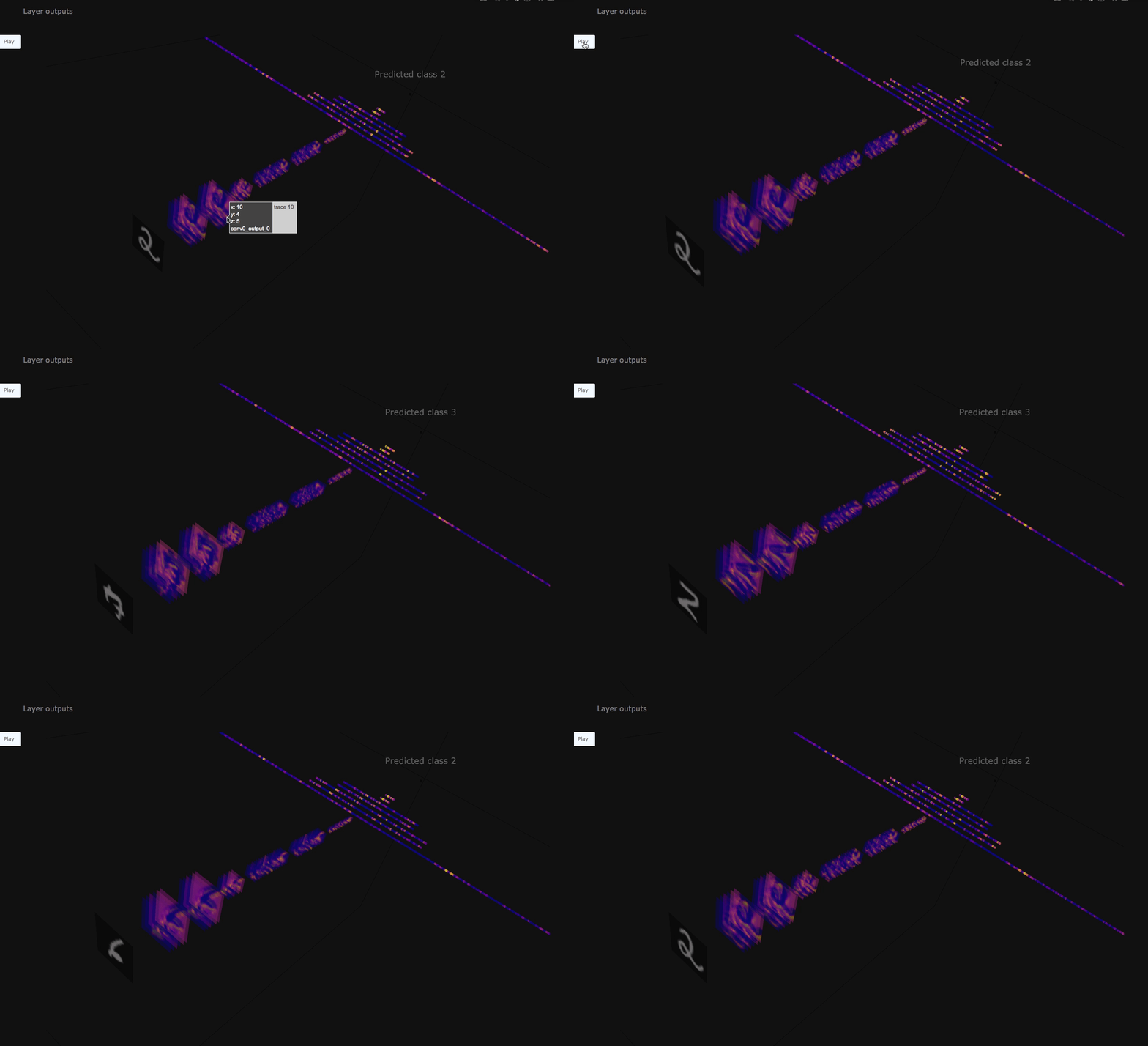
TensorPlot normalizes tensor values to the range 0 to 1 which means colorscales are the same across layers. Blue indicates value close to 0 and yellow indicates values close to 1. This class has been designed to plot convolutional networks that take 2D images as input and predict classes or produce output images. You can use this for other types of networks like RNNs, but you may have to adjust the class as it is currently neglecting tensors that have more than 4 dimensions.
Let’s plot Relu output activations for the given MNIST training example.
[6]:
import tensor_plot

visualization = tensor_plot.TensorPlot(
    regex=".*relu_output",
    path=folder_name,
    steps=10,
    batch_sample_id=0,
    color_channel=1,
    title="Relu outputs",
    label=".*sequential0_input_0",
    prediction=".*sequential0_output_0",
)
[2020-04-27 22:58:22.594 f8455ab5c5ab:166 INFO local_trial.py:35] Loading trial debug-output at path debug-output
[2020-04-27 22:58:22.632 f8455ab5c5ab:166 INFO trial.py:198] Training has ended, will refresh one final time in 1 sec.
[2020-04-27 22:58:23.635 f8455ab5c5ab:166 INFO trial.py:210] Loaded all steps
If we plot too many layers, it can crash the notebook. If you encounter performance or out of memory issues, then either try to reduce the layers to plot by changing the regex or run this Notebook in JupyterLab instead of Jupyter.
In the below cell we vizualize outputs of all layers, including final classification. Please note that because training job ran only for 1 epoch classification accuracy is not high.
[7]:
visualization.fig.show(renderer="iframe")
For additional example of working with debugging tensors and visualizing them in real time please feel free to try it out at MXNet realtime analysis example.